A useful shortcut hiding on the remote
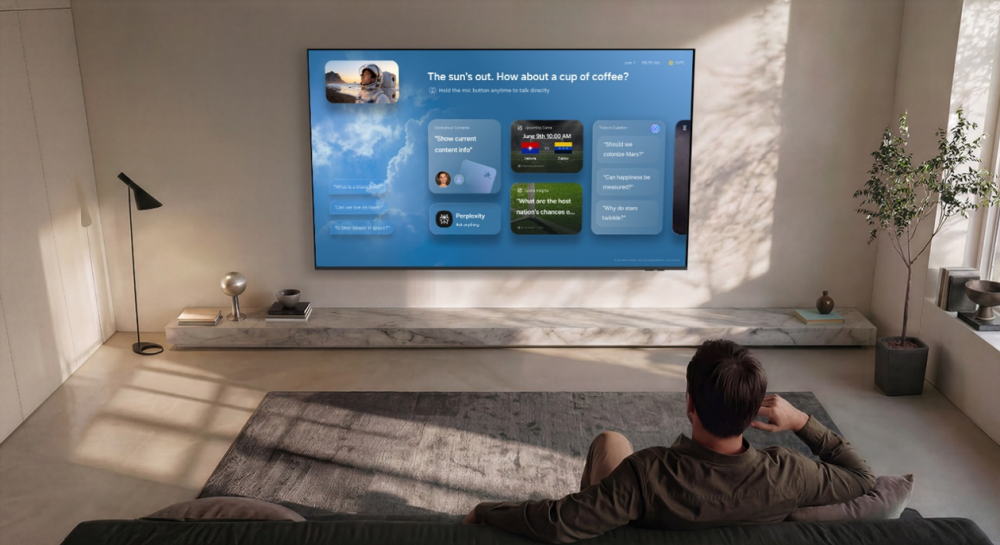
Samsung’s September IFA recap highlights a different role for the television: a shared screen where viewers can ask for information and recommendations. Vision AI Companion brings conversational services into the viewing experience, alongside the company’s picture and sound enhancements. This is an existing feature worth finding, rather than a new launch today.
Open it, then speak
Samsung’s July Australian guide gives the practical sequence. On a supported 2026 remote, use the AI button. Compatible remotes without that button use a long press of Home. Once the companion opens, hold the microphone button to speak. Follow-up questions and related suggestions stay on the television.
The distinction matters: opening the companion and speaking to it are separate actions. If you have been searching the ordinary TV menus, the remote shortcut is the more direct place to begin.
Check your particular television
Samsung lists support that depends on the model, market and viewing source. Its Australian guidance includes compatible 2025 Q7F-and-above televisions as well as 2026 models; it is not a promise for every older Samsung set. An internet connection and Samsung account are required, and first use includes a privacy notice.
A useful first experiment is a simple content question followed by a narrower request. That tests whether this shared-screen interaction is convenient for your household. Samsung’s pictured interface illustrates the feature; we have not independently tested its answer quality.
Source published 2026-09-11. Coverage is based on the maker’s announcement and demonstration.